What is PaymentSafe?
PaymentSafe is an escrow service for African peer-to-peer marketplaces. When a buyer and seller agree on a deal, the buyer pays into a secure vault. Funds are held safely until the buyer confirms delivery — then the seller is paid. Neither party can be scammed.
PaymentSafe is not a payment gateway — it sits on top of Paystack and adds the escrow trust layer. Your app collects buyer and seller phone numbers, creates an escrow via the API, and PaymentSafe handles the rest.
| Integration | Best for |
|---|---|
| REST API | Any backend — Node.js, Python, PHP, Go, etc. |
JS SDK (paymentsafe-js) | Node.js, Next.js, Nuxt, browser apps |
MCP Server (paymentsafe-mcp) | AI IDEs: Cursor, Claude, Windsurf, Kiro, Cline, Roo Code, Continue, VS Code |
Create your first escrow in 2 minutes
Step 1 — Get an API key
Sign up at paymentsafe.business → Developer Portal → My Apps → create a new app. You receive a sandbox key (sk_sandbox_...) immediately.
Step 2 — Create an escrow
cURL# Create a GHS 6,500 escrow for an iPhone 14
curl -X POST "https://api.paymentsafe.business/v1/transactions" \
-H "Authorization: Bearer sk_sandbox_your_key" \
-H "Content-Type: application/json" \
-d '{
"title": "iPhone 14 Pro Max",
"price": 6500,
"currency": "GHS",
"buyerPhone": "+233540000001",
"sellerPhone": "+233244000002",
"inspectionDays": 3
}'Step 3 — Response
{
  "id": "tx-api-1234567890-abc123",
  "title": "iPhone 14 Pro Max",
  "status": "CREATED",
  "currency": "GHS",
  "price": 6500,
  "fee": 195,
  "sandbox": true,
  "verificationUrl": "https://paymentsafe.business/verify/tx-api-1234567890-abc123",
  "createdAt": "2026-07-07T12:00:00.000Z"
}
Share the verificationUrl with both buyer and seller so they can track the deal in real time.
sk_sandbox_* keys for testing — no real money moves. Switch to sk_live_* when going live.API Keys
All authenticated requests require an Authorization header:
Authorization: Bearer sk_sandbox_your_key_here| Key prefix | Type | Permissions |
|---|---|---|
sk_sandbox_ | Secret sandbox | Read + write (test mode, no real money) |
sk_live_ | Secret live | Read + write (real money) |
pk_ | Public | Read-only (safe for frontend use) |
sk_ secret key in client-side code or version control. Store it in environment variables only.Sandbox vs Live
| Feature | Sandbox | Live |
|---|---|---|
| API base URL | https://api.paymentsafe.business/v1 | |
| Key prefix | sk_sandbox_ | sk_live_ |
| Real money | No | Yes |
| Paystack charges | No | Yes |
| Transaction limit | Unlimited | 50/month (free tier) |
How to get your Live API Keys
When you are ready to go to production, you need two keys: a public key (pk_live_...) for your frontend, and a secret key (sk_live_...) for your backend. Here is the exact step-by-step process to obtain them from the portal.
Open paymentsafe.business in your browser. Click the “Sign In” button in the top-right corner of the navigation bar.
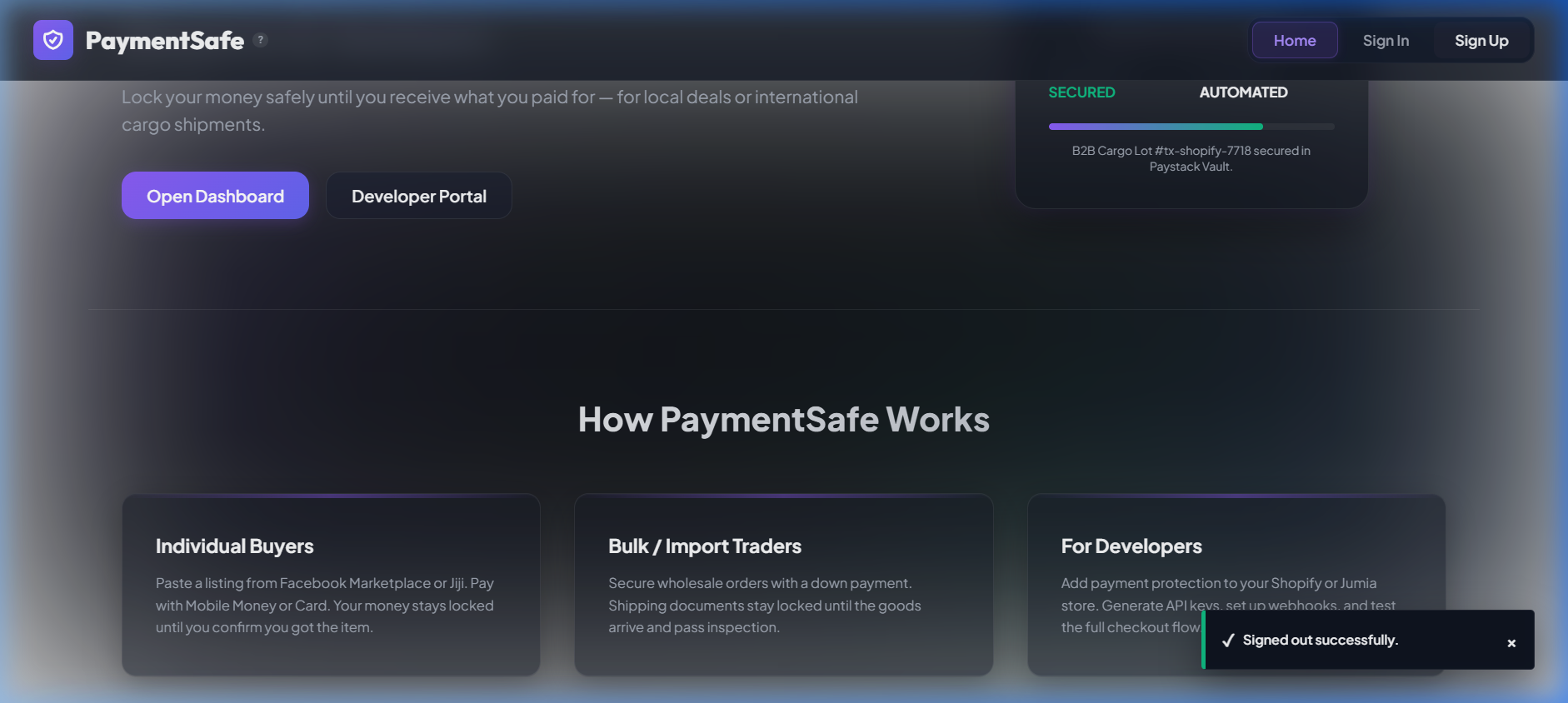
A sign-in modal will appear. Enter your developer email address and password, then click “Sign In”. If you don’t have an account yet, click “Sign Up” to register a free developer account.
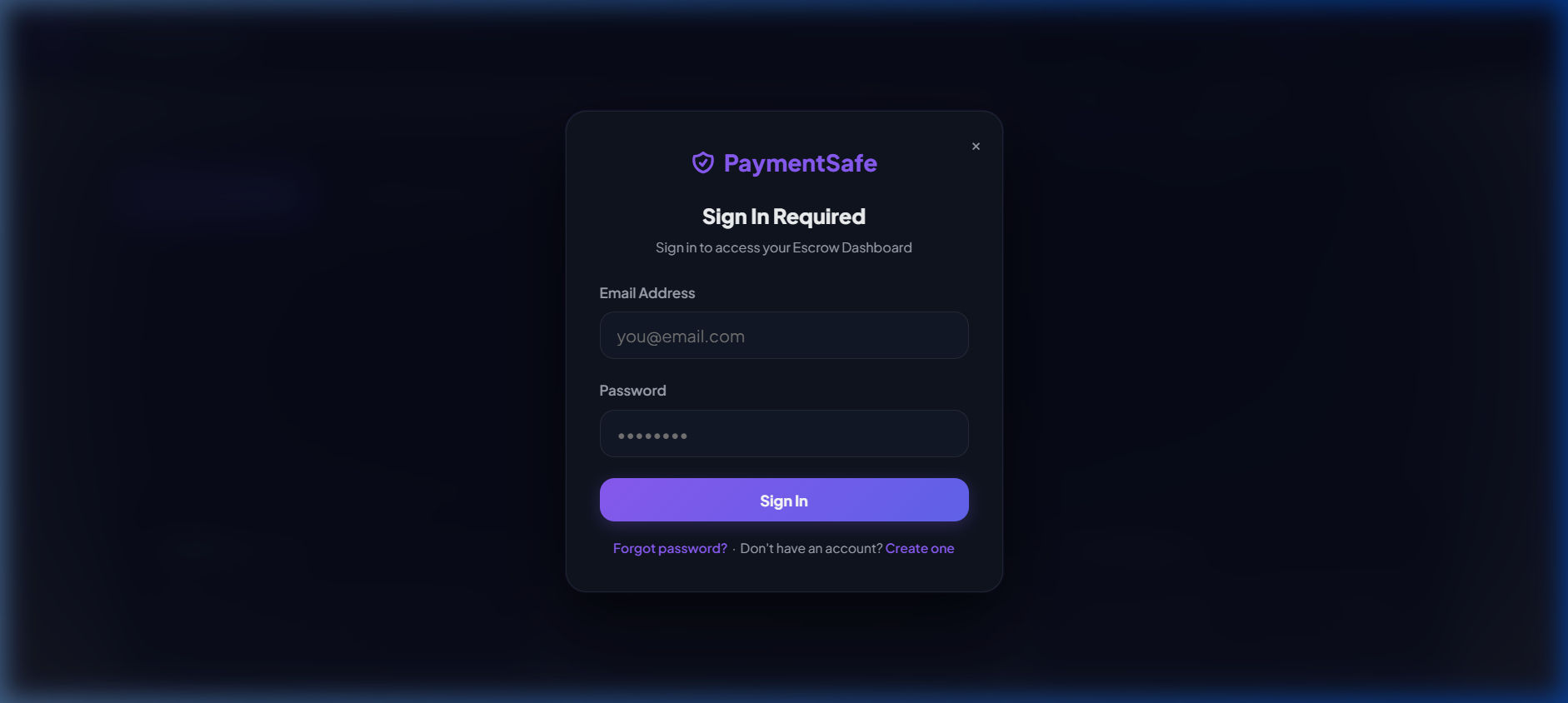
Once logged in, look for the “API Portal” tab in the top navigation bar and click it. This is the developer hub where all your API credentials and settings live.
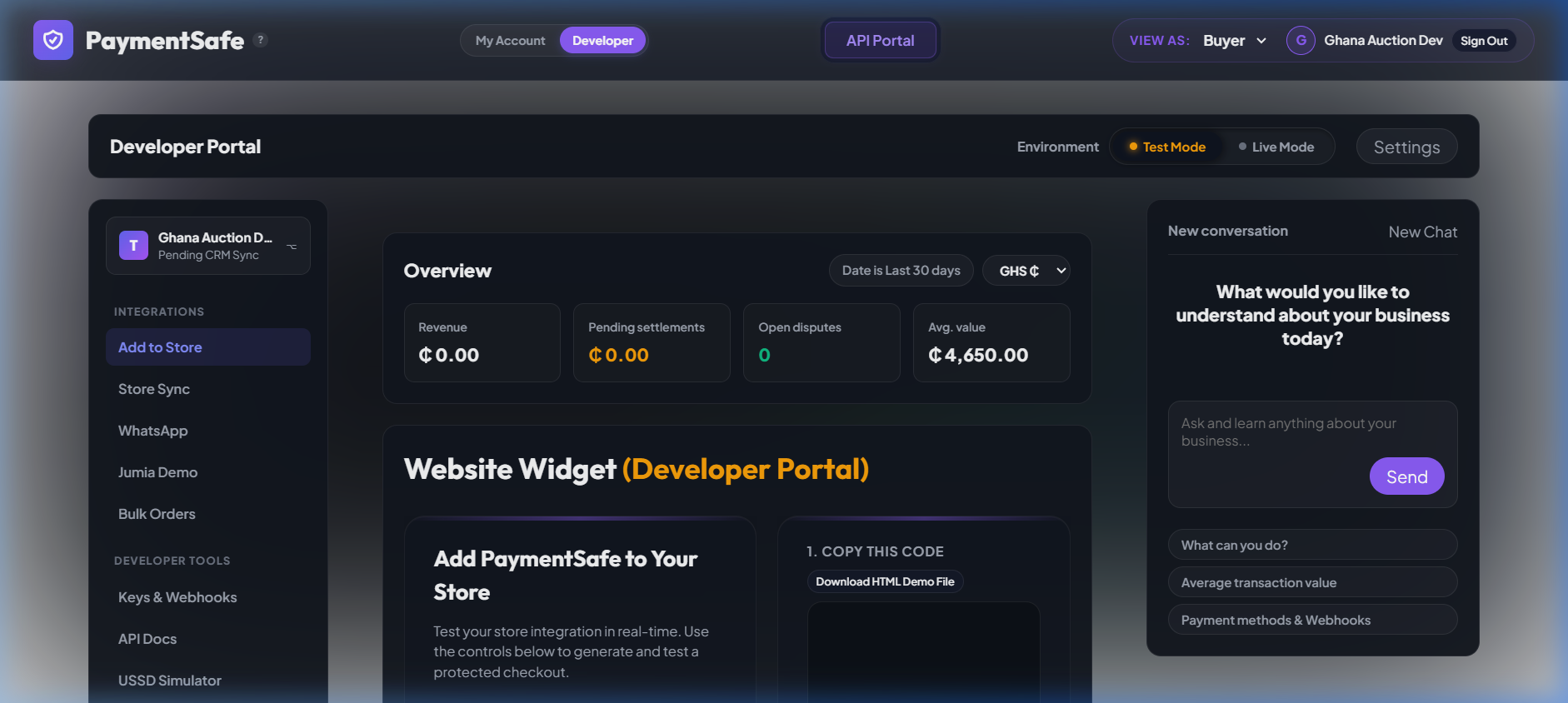
In the Developer Portal sidebar under Developer Tools, click “Keys & Webhooks”. You will land on the API credentials page in Test Mode by default — showing your sandbox keys (pk_test_... / sk_sandbox_...).
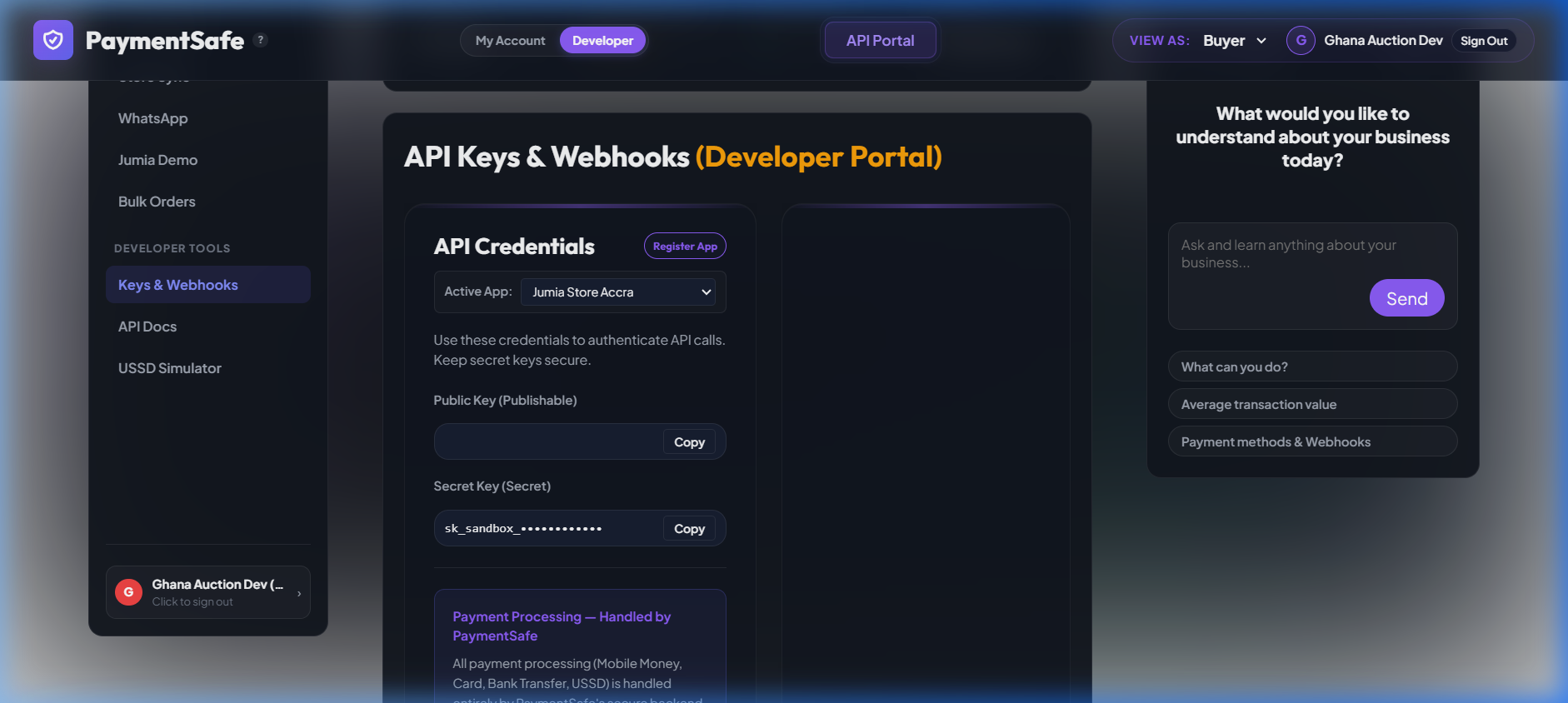
Click the “Live Mode” toggle at the top of the page. You will see a confirmation message: “Switched Developer Portal to Production (live) mode.”
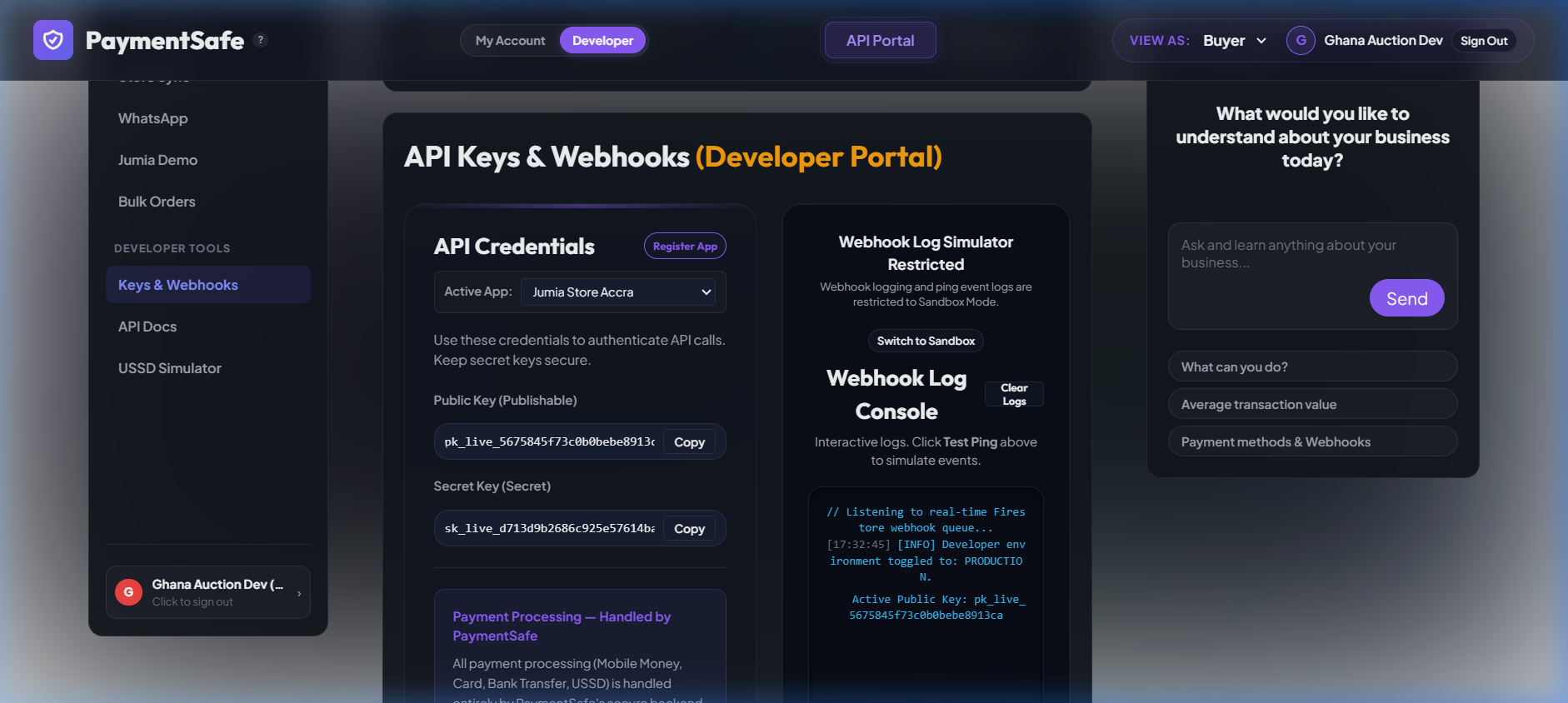
Your live credentials are now visible. Click the “Copy” button next to each key and store them as follows:
pk_live_...
.env.local as PAYMENTSAFE_PUBLIC_KEYsk_live_...
PAYMENTSAFE_PUBLIC_KEY=pk_live_your_key_herefirebase functions:secrets:set PAYMENTSAFE_SECRET_KEY
# When prompted, paste your sk_live_... key and press Enter.env.local is already in .gitignore — it will never be committed. The secret key stored via Firebase Secrets is encrypted at rest and only injected into Cloud Functions at runtime.Base URL & Headers
https://api.paymentsafe.business/v1

Authorization: Bearer <your_api_key>
Content-Type: application/json
Transactions
Create a new escrow transaction between a buyer and seller.
| Field | Type | Required | Description |
|---|---|---|---|
title | string | ✅ | Item being sold (e.g. "iPhone 14 Pro Max") |
price | number | ✅ | Amount as a number (e.g. 6500) |
currency | string | ✅ | GHS, USD, or EUR |
buyerPhone | string | ✅ | Buyer phone in international format (+233...) |
sellerPhone | string | ✅ | Seller phone in international format |
inspectionDays | number | No | Days to inspect after delivery (default: 3) |
description | string | No | Optional deal details |
milestones | array | No | Phased payment milestones |
List all transactions for this API key (most recent 50, newest first).
Get a single transaction by ID.
Publicly verify any transaction. Safe to call from a frontend — no secret key needed.
Buyer requests fund release to seller. Moves status to AWAITING_PAYOUT. Final payout executed by PaymentSafe staff.
Confirm buyer received the item. Moves status to DELIVERED.
Open a dispute. Funds are frozen immediately and PaymentSafe staff reviews within 24 hours. Optionally pass { "reason": "..." } in the body.
Exchange Rates
Get live GHS/USD/EUR exchange rates. Cached for 10 minutes.
{ "USD_GHS": 15.20, "EUR_GHS": 16.50, "source": "cache" }Health Check
{ "status": "ok", "service": "PaymentSafe API", "version": "1.0" }Errors
| HTTP Status | Code | Meaning |
|---|---|---|
| 400 | missing_fields, invalid_currency | Fix your request body |
| 401 | missing_auth, invalid_key | Missing or invalid API key |
| 403 | forbidden, suspended | Not authorised for this resource |
| 404 | not_found | Transaction not found |
| 409 | invalid_transition | Invalid status change attempted |
| 429 | rate_limited | 100 req/hour limit exceeded |
| 500 | internal_error | Contact support@paymentsafe.business |
Rate Limits
100 requests per hour per API key on the free plan. Window resets every 60 minutes. Contact hello@paymentsafe.business to discuss higher limits.
Installation
npm install paymentsafe-js
# or
yarn add paymentsafe-js
Usage
CommonJS (Node.js)const { PaymentSafe } = require('paymentsafe-js');
const ps = new PaymentSafe({ apiKey: 'sk_sandbox_your_key' });
// Create escrow
const txn = await ps.transactions.create({
title: 'iPhone 14 Pro Max',
price: 6500,
currency: 'GHS',
buyerPhone: '+233540000001',
sellerPhone: '+233244000002'
});
console.log(txn.verificationUrl); // share with buyer & seller
// Other methods
await ps.transactions.get('tx-api-xxx');
await ps.transactions.confirmDelivery('tx-api-xxx');
await ps.transactions.release('tx-api-xxx');
await ps.transactions.dispute('tx-api-xxx', 'Item not as described');
await ps.rates.get();import { PaymentSafe, PaymentSafeError } from 'paymentsafe-js';
const ps = new PaymentSafe({ apiKey: process.env.PAYMENTSAFE_API_KEY! });
try {
const txn = await ps.transactions.create({ ... });
} catch (err) {
if (err instanceof PaymentSafeError) {
console.error(err.code, err.status, err.message);
}
}Webhook Verification
Express.jsconst { verifyWebhook } = require('paymentsafe-js/webhooks');
app.post('/webhooks/escrow', express.raw({ type: 'application/json' }), (req, res) => {
const event = verifyWebhook(
req.body,
req.headers['x-paymentsafe-signature'],
process.env.PAYMENTSAFE_WEBHOOK_SECRET
);
if (event.type === 'escrow.funded') {
// Safe to ship — payment is secured in escrow
}
res.sendStatus(200);
});x-paymentsafe-signature header before processing events.PaymentSafe for AI IDEs
The paymentsafe-mcp package is a Model Context Protocol (MCP) server that lets AI coding assistants create and manage escrow transactions using natural language — no API boilerplate required.
IDE Setup
All IDEs use the same JSON config block:
{
  "mcpServers": {
    "paymentsafe": {
      "command": "npx",
      "args": ["-y", "paymentsafe-mcp"],
      "env": {
        "PAYMENTSAFE_API_KEY": "sk_sandbox_your_key_here"
      }
    }
  }
}
Full per-IDE instructions: npmjs.com/package/paymentsafe-mcp
Available MCP Tools
| Tool | Description |
|---|---|
create_escrow | Create a new escrow transaction |
get_transaction | Get status and details by ID |
list_transactions | List all transactions (last 50) |
release_funds | Request fund release to seller |
open_dispute | Freeze funds and open a dispute |
confirm_delivery | Confirm buyer received item |
get_rates | Get live GHS/USD/EUR exchange rates |
Transaction Statuses
| Status | Meaning | Next step |
|---|---|---|
| CREATED | Awaiting buyer payment | Share verificationUrl |
| PART_FUNDED | Partial/down payment received | Await balance |
| FUNDED | Fully funded — seller can ship | Seller ships |
| SHIPPED | Seller dispatched order | Await delivery |
| DELIVERED | Buyer confirmed receipt | Release funds |
| AWAITING_PAYOUT | Release requested, staff processing | Await staff approval |
| RELEASED | Funds sent to seller | ✅ Deal complete |
| DISPUTED | Dispute opened, funds frozen | Staff review (24h) |
| REFUNDED | Funds returned to buyer | Deal closed |
Webhook Events
PaymentSafe sends a signed POST to your webhookUrl on every status change. Retried up to 5 times with exponential backoff.
// Example payload
{
  "event": "escrow.funded",
  "timestamp": 1751886000,
  "data": {
    "id": "tx-api-1234567890-abc123",
    "status": "FUNDED",
    "currency": "GHS",
    "price": 6500,
    "fee": 195,
    "sandbox": false
  }
}
Signature header: x-paymentsafe-signature (sha256=HMAC hex)
Currencies & Countries
| Currency | Code | Countries |
|---|---|---|
| Ghanaian Cedi | GHS | 🇬🇭 Ghana (primary market) |
| US Dollar | USD | 🇳🇬 Nigeria · 🇰🇪 Kenya · 🇺🇬 Uganda · 🇹🇿 Tanzania · 🇷🇼 Rwanda · 🇿🇲 Zambia · 🇸🇳 Senegal · and more |
| Euro | EUR | Cross-border & diaspora payments |
Payment methods (via Paystack): Mobile Money (MTN, Vodafone, AirtelTigo), Debit/Credit Cards (Visa, Mastercard), Bank Transfer, USSD. No smartphone required for USSD access.
Fees & Pricing
Common Setup Issues
Running into a problem? These are the most frequent issues developers encounter when integrating PaymentSafe.
Firebase Cloud Functions can only make outbound network requests (to Paystack, SMS providers, etc.) on the Blaze pay-as-you-go plan. The free Spark plan blocks all external calls from functions.
How to upgrade to Blaze:
- Go to console.firebase.google.com and select your project
- Click “Upgrade” in the bottom-left of the Firebase console sidebar
- Select Blaze (Pay as you go) and click “Continue”
- Add a Google Cloud billing account (credit or debit card required)
- Return to your terminal and redeploy your functions:
firebase deploy --only functionsAfter deploying, return to the PaymentSafe API Portal and click “↻ Refresh Status” — Cloud Functions should show Active.
Features that require Blaze:
| Feature | Works on Spark (free)? | Works on Blaze? |
|---|---|---|
| Firestore reads / writes | ✅ Yes | ✅ Yes |
| Firebase Authentication | ✅ Yes | ✅ Yes |
| Static Hosting | ✅ Yes | ✅ Yes |
| Paystack webhook processing | ❌ No | ✅ Yes |
| SMS / USSD notifications | ❌ No | ✅ Yes |
| Live exchange rates | ❌ No | ✅ Yes |
| Escrow fund releases | ❌ No | ✅ Yes |
401 UnauthorizedThis means your API key is missing, malformed, or revoked. Check the following:
- Make sure the
Authorizationheader is formatted exactly as:Bearer sk_sandbox_your_key - Confirm you are using the correct key for the environment —
sk_sandbox_*for test,sk_live_*for production - Go to paymentsafe.business → API Portal → Keys & Webhooks and verify your key is still active
- If the key was rotated or deleted, generate a new one and update your environment variables
Webhooks require a publicly accessible HTTPS URL. If you are developing locally, your localhost cannot receive them directly.
- Use ngrok to expose your local server:
ngrok http 3000 - Copy the forwarding URL (e.g.
https://xxxx.ngrok-free.app) - Paste it into the Webhook URL field in your API Portal settings
- Always verify the
x-paymentsafe-signatureheader before processing any event — see the Webhook Verification section
Sandbox and live environments are completely isolated. Transactions, webhooks, and data do not cross between them.
| Key prefix | Environment | Real money? |
|---|---|---|
sk_sandbox_ | Test / Sandbox | No |
sk_live_ | Production / Live | Yes |
If you are not seeing your data, verify which key your application is currently using and switch to the correct environment in the API Portal.
The PaymentSafe REST API is designed to be called from a server-side backend, not directly from a browser. Calling it from client-side JavaScript exposes your secret key.
/v1/transactions with your sk_* secret key from browser code. Your secret key will be visible to anyone who inspects the network tab.Correct architecture:
- Your frontend sends a request to your own backend (Node.js, Firebase Function, etc.)
- Your backend holds the
sk_*secret key in an environment variable - Your backend calls the PaymentSafe API and returns the result to the frontend
The only PaymentSafe endpoint safe to call from a browser is the public GET /v1/transactions/:id/verify endpoint, which requires no secret key.
429 Too Many RequestsThe free plan allows 100 API requests per hour per key. If you exceed this, requests are rejected with a 429 status until the window resets.
- Add retry logic with exponential backoff in your integration
- Cache responses where possible (e.g. exchange rates are cached for 10 minutes)
- If you need higher limits, contact hello@paymentsafe.business to discuss an upgraded plan
sk_sandbox_abc...) and the full error response so we can help faster.Made with ❤️ by Transoft Technologies · Accra, Ghana
Home · paymentsafe-js · paymentsafe-mcp · hello@paymentsafe.business